Unlocking SEO: How Keyword Titles Boost Video Views

I honestly never thought much about SEO (search engine optimization) until one of my students. Grant, decided to take on that topic as his final senior project in our Professional Writing major. He had found the topic interesting during our Social Media Strategy class and decided he wanted to learn more.

He researched deep into the weeds of the topic, wrote his paper, and did a final presentation that allowed him to consolidate the research and give the basics of search engine optimization in a presentation that was understandable to those of us who knew nothing. After graduation, Grant got a job with Visit Indiana, the tourism arm of the State of Indiana — now working as webmaster for their website with its tens of thousands of pages. When it comes to SEO, he knows his stuff.

Search engine optimization basically optimizes your search on the search engines … which means that we want to write our titles and posts and internet copy using key words that searchers are going to put into the search bars. When we do so, there is more chance of the algorithm finding our material and bringing it higher on the results. (That’s a way-too-simplified version and it’s beyond my comprehension, but I do understand working with words to match search words.)

Every semester, Grant graciously returns to my classroom to present that basic introduction to SEO to my students. Many of them have no idea what it is or how to use it.

And, if I’m honest, neither did I.

I had started a YouTube channel a few years ago with nothing more than a few screenshotted videos of me showing writers how to do various tasks in Microsoft Word (creating a title page, creating a Table of Contents, etc.). I recorded one of them because a former employer asked me to show how to do style tagging so they could send the video to clients. I created others to go along with my Pathway to Publication book as part of the manuscript formatting chapter. My little YouTube channel sat fairly quiet, with a few folks clicking on and viewing my videos.

As Grant taught about SEO, he explained the power of using key words in titles and descriptions, thinking of what a searcher on Google is going to ask. He suggested that we plug in some questions, and then scroll down to the “People also ask” section to get an idea of those googled questions, the “How do I …?” questions. I went back and changed the titles and descriptions to my eight videos (I know, I said it was a small channel) to questions or statements someone would actually put into Google.

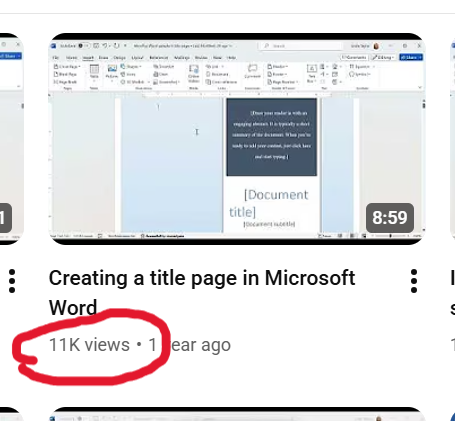
For instance, “Title pages” became “Creating a title page in Microsoft Word,” and in the description of the video is the question, “How do I add a title page to my manuscript?”

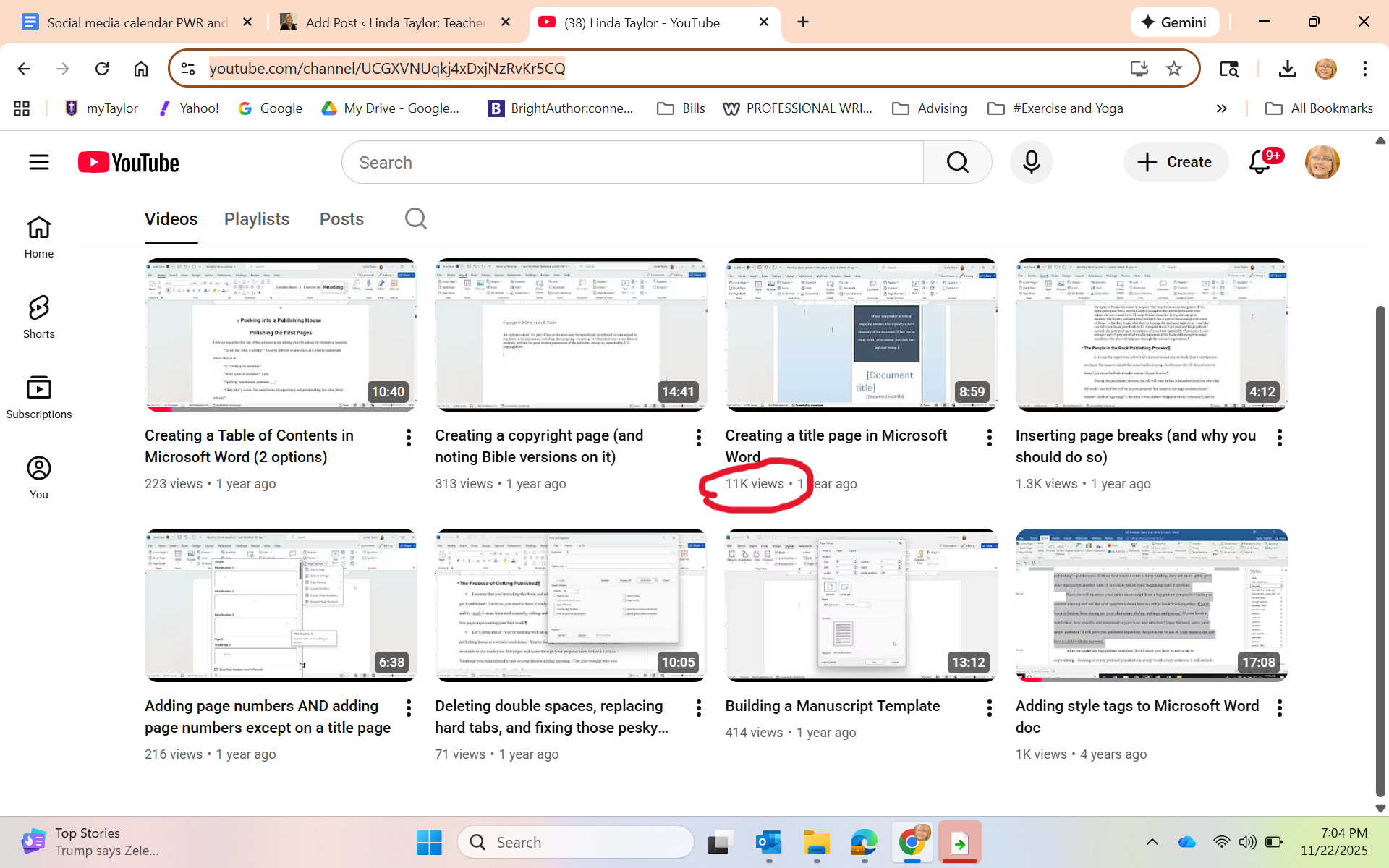
A few months passed without me checking in. Last week, I opened the YouTube page to show it to the students in my Editing class to let them know some of the things we talked about in class are in video form there. One student piped up: “Wow, you have 11,000 views on that one video.”

Whaaaaat?

Just in case you can’t see it:

I honestly didn’t think it was real. I sent the screenshot to Grant, thanking him profusely and asking him also if this could even be real. He checked it for me, and then sent me this screenshot, showing that my video appears as the first video option when he googled “how to create a title page in Microsoft Word.”

“You should be proud of yourself,” he kindly said.

I don’t think I’d say that. I just find it exciting to see that yes, indeed, SEO thinking works. AND that so many folks happened upon my little video and, hopefully, made killer title pages!

I’m basically an influencer now …

Great editors: Starling Lawrence

I was asked recently about what God has taught me through my writing career. While I do admit to enjoying writing, really most of my learning has been through my editing career. In both cases, however, the key lesson has been humility.

On the one hand, writers need humility to handle the (often many) edits of our work, and (often) outright rejection. Editors also require humility because we labor in the background. We don’t get credit for the work; that remains with the author, as it should. But those books became what they did because of the hard work of the editor with the author. That’s why I’ve enjoyed celebrating unsung editorial heroes on this blog; folks such as Maxwell Perkins, Faith Sale, and Tay Hohoff, among others.

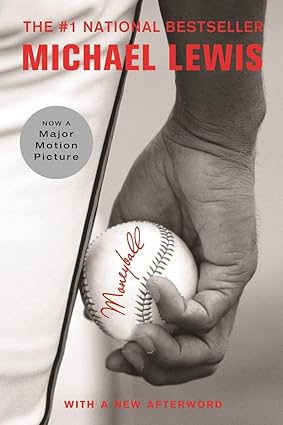
This past month, we lost yet another legendary editor, Starling Lawrence, who had a 55-year editorial career at W. W. Norton. I have to admit, of course, I’d never heard of him, but I’ve certainly heard of books he edited, including The Perfect Storm by Sebastian Junger, and Moneyball and The Blind Side by Michael Lewis (all three of which were books before they became movies).

When he started at Norton in 1969, Lawrence had the unenviable job of “reader,” sifting through the “slush pile,” the name for the pile of unsolicited manuscripts that came into the offices and were dropped somewhere for someone to eventually take the time to read. He said that this job taught him “an important lesson about patience and paying attention to the job, no matter what it is.” Publisher’s Weekly noted that, “As he panned for gold among the submissions, he trained ‘a voice that has endless patience for what does interest him,’ as Lewis put it.”

The W.W. Norton website wrote this tribute: “During his more than five decades at Norton, Lawrence had an unmatched impact on the trade list, shaping its character with culturally important books that sold millions of copies. Lawrence discovered future bestsellers in unlikely places: the slush pile of unsolicited manuscripts, the dusty top shelf of an agent’s bookcase, and in proposals rejected by the rest of the industry. As he once noted, ‘It is remarkable in hindsight that for two of the most important books I ever acquired, Sebastian Junger’s The Perfect Storm and Michael Lewis’s Liar’s Poker, there were no other offers on the table.’”

With the latter author, Michael Lewis, Lawrence built a strong relationship that led to 17 books, including the above-mentioned Moneyball and The Blind Side. Lewis wrote of Lawrence, “When I sit down to write, the only voice I hear in my head is Star’s” (W.W. Norton website).

That’s a powerful editor/author relationship!

Across his five decades at Norton, Lawrence championed and edited “scores of era-defining books” (ShelfAwareness). “‘It is impossible to overstate the effect Star Lawrence has had on Norton,’ said Julia Reidhead, chairman and president. ‘His taste was as confident and true as his spirit, and he transformed our list with some of the greatest writers of our time'” (W.W. Norton website).

That’s an amazing legacy. While he did write a few of his own books, he spent most of his career in the shadows, behind the scenes, relegated to the Acknowledgments page (if at all) of the many books for which he as the best reader, the shaper, the author encourager.

That’s what I’m teaching my students in Editing class right now. If they want this career, it will be extremely rewarding but will not bring them fame or fortune. They must do it for the love of the words and the love of good stories.

4 reasons to attend the Taylor University Professional Writers Conference

One of the hats I wear is coordinator of the annual Taylor University Professional Writers Conference, held every summer on the university’s beautiful campus. And I am inviting you.

Just a little over 10 years ago, we started this conference, wondering, “If we build it, will they come?” Well, came they did, and we’ve been running a successful conference ever since. The conference is a natural outgrowth of the Taylor University Professional Writing major, where students are trained, among other things, to navigate the world of publishing. Meeting and networking (and sometimes interning) with agents, authors, editors, and social media experts from across the Christian publishing industry is just one of the many plusses of our program.

Here are 4 reasons you should attend our 2025 conference:

1. It’s short and inexpensive.

Our General Conference runs a day and a half and is packed with sessions and fun. It runs from Friday, July 25 at 1:00 to Saturday, July 26 at 5:00. During that time are options of 32 different sessions, 3 keynotes, open mic readings, faculty book signing, and one-on-one appointments.

And all of that (including meals) for just $139. You’ll get Friday dinner, and Saturday breakfast and lunch, and all of the activities above. If you’d like to stay overnight on campus, you can for an extra fee of $70/night.

2. Add a day for some extra, advanced training.

For $139, including meals, you can opt to come to one of our pre-conference tracks. Beginning at 1:00 on Thursday, July 24 and ending with lunch on Friday, July 25. This is an opportunity to go deeper with a particular topic. You can choose from the following two options.

Option A: Deep POV / Prepping Your Proposal

In this Advanced Track, you’ll be privileged to learn from literary agent, Linda Glaz, who had been acquiring manuscripts, editing them, and coaching writers for 13 years. You’ll learn on Thursday about deep POV, the kind of writing that will deepen the experience of the reader and allow him/her to stay in the characters’ points of view. Then, on Friday, you’ll do a deep dive into how to write a solid book proposal–one of your first steps for the gatekeepers in the publishing work.

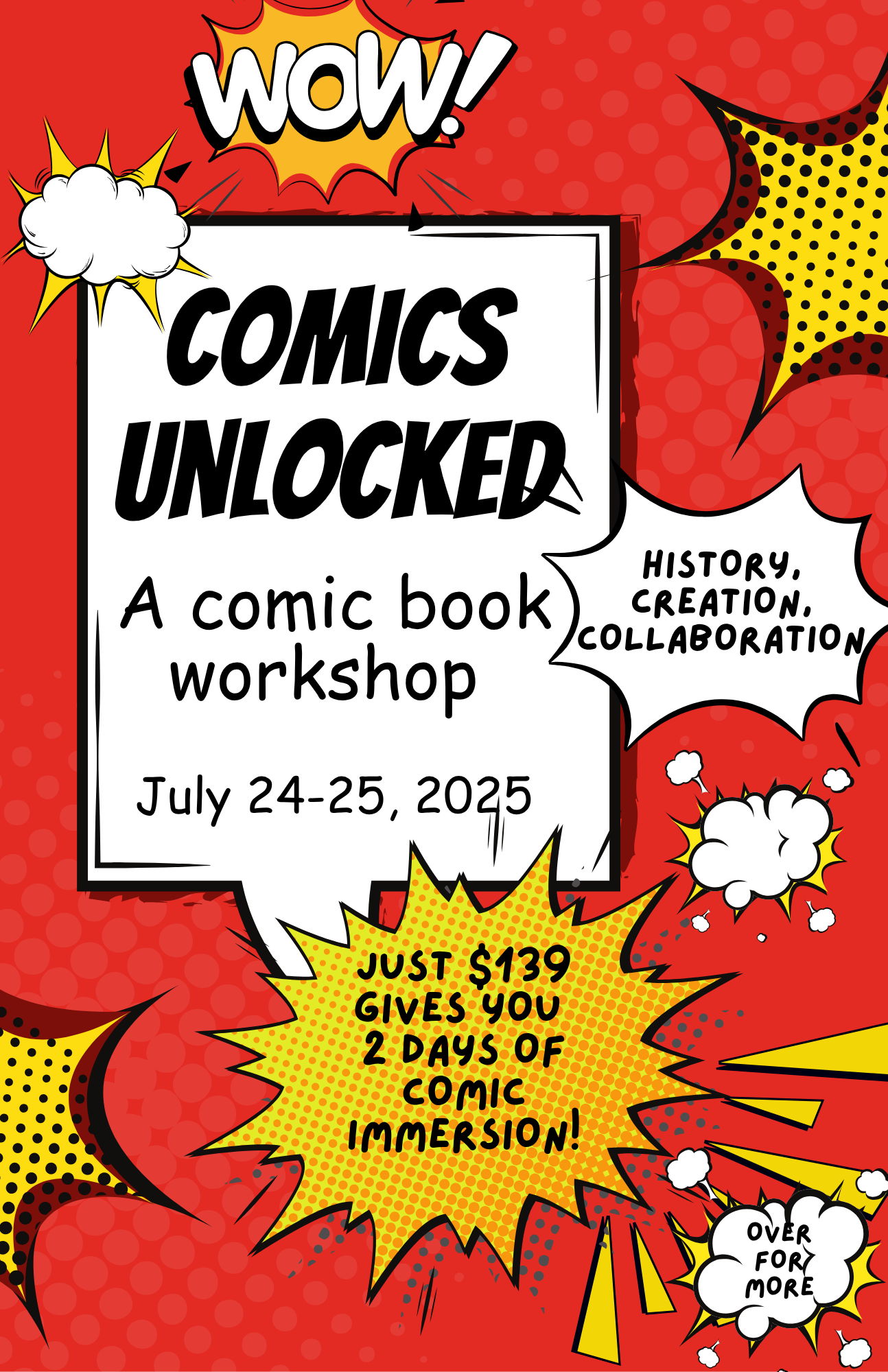
Option B: Comics Unlocked

​Your teachers (two Taylor U students) have been interested in comic books for their entire lives and are excited to share their knowledge with you. In their Comics Unlocked sessions, you’ll learn the history of comics, the craft of comic book creation (including formatting, script writing, pacing, and page layout), the artist/writer collaboration process, and possible paths to publication. You’ll also have the opportunity to work on your own comic book pitch and plan.

3. Do both a pre-conference track and the general conference for a reduced price.

If you choose one of the pre-conference tracks AND the general conference, you get both for $249. You’ll move seamlessly from having lunch on Friday after your pre-conference session to the general conference that begins at 1:00 p.m.

Some snapshots from our 2024 conference.

4. We’re great for all ages, types, and levels of writers.

Never been to a conference before? We’re ready to help you navigate with our friendly faculty and helpful staff (who just happen to be Taylor U Professional Writing students).

Just getting your feet wet in the writing world? We’re great for beginning writers to learn about what it takes and how to get started when it comes to being a writer.

Think you’re too old to start writing? You’re never too old. Lots of Bible characters have taught us that.

Think you’re too young? If you’re at least 16, we especially want to invite you to the conference. You’ll get to take part in all the sessions and networking, plus our college student staff will give you evening activities and a sense of what college life is all about.

Thinking you’re too advanced to need a conference? Maybe you’ve been around the industry a long time; maybe you’re a published author. Even so, there is never a time that you don’t need a refresher or some encouragement. And even better, you bring your expertise to those newer writers.

Check out the conference website at www.tupwc.com and register today!

A “Find Your Tribe” gathering of nonfiction writers at the 2024 conference.

Trying to meet the AI challenge: Part 2

As I noted in this post at the end of December, I was studying ways to teach my students how to use AI (artificial intelligence; in this case, specifically ChatGPT). However, “teaching them how to use” is a misnomer because I quickly discovered that students already are using it. And I was naive to think otherwise.

That discovery meant that my lesson preparation turned from presenting the opportunity of AI to instead focus on the ethical and practical uses of AI when writing. From a course like Essentials of Written Communication (business writing), students need to learn to be able to use AI well when they get into their internships or jobs. In fact, ability to use AI, write prompts, and yet understand AI’s limitations, will be a requirement by employers.

https://learn.aiacontracts.com/articles/

But first …. let’s understand what AI can and can’t do. I had the students read the article: “The Good, the Bad, and the Ugly of AI Writing.” Here’s a synopsis:

AI can be good and helpful because it can save time, thus making employees more productive, and it can help reduce human error. (For instance, even using a program like Grammarly or the Editor in Microsoft Word is using AI to help clean up writing.) I want my students to see that AI can be helpful with time-saving idea generation, editing, and yes, even some first draft preparation.

For my students, it will be important to learn how to write good prompts and create perhaps some initial ideas for drafts of documents they will need in their future jobs, help them with research, provide guidance when making sense of statistics, etc. Learning how to use AI well will be a timesaver, allowing them time to do other important aspects of their job.

But ..

AI can be bad for myriad reasons. It is only as creative as what is already “out there”; thus, it really has no creativity or originality. It only takes what others have done as everything appears online. (As a writer, this for me is the nonstarter. I refuse to let it do any writing for me. Indeed, I am writing this blog post all on my own!)

Students who use AI to write their papers end up with writing that (ahem) is often easy for teachers to spot. (Not always, but sometimes.) One of the key assignments my colleagues and I are doing is to have students write something in class at the beginning of a semester, which gives us a sense of their writing ability and style. That provides us with a benchmark to work from. And we check all quotes and sources to make sure they exist and are correct.

Students must never depend on AI to deliver a final product. It needs their human eyes and human voice. Thus, they need to know how to edit, what to look for, and how to take what AI gives them and polish it.

But …

AI can be ugly because it doesn’t have ethical standards. It’s happy to write pages of uninspired, generic material, make up quotes, make up sources, make up statistics, all while using everyone else’s ideas that exist in online world.

My students need to find the uses for AI that are helpful but not unethical, such as brainstorming, clarifying material that is difficult to understand, even help with foreign language learning. As a professor, I have had it create some games to make the point of a lesson, or give me some case studies to use, or even advise on how to simplify a concept for my students.

For instance, one assignment we did in class was to have each student write an email to a prospective student. We discussed audience, format, and structure of good emails. We put the characteristics of our target audience on the board.

I gave them a worksheet on which they did the following three activities — all three of which would be turned in. First, write an email in class, without any kind of AI help. Second, create a prompt and put it in ChatGPT, then copy and paste onto the worksheet both the prompt and the generated email. Third, create a final email starting with the original and incorporating anything from AI that seemed helpful (and highlight those things).

I was pleasantly surprised to discover that, in most cases, the first email written on their own was just fine, but they did at times incorporate another point or even a particular phrase that they liked from the AI-generated version. And I did ask them to run their final version through the Microsoft Editor (yes, still an AI) to help them clean up any grammatical or spelling errors.

I’m hoping from this lesson they learned that some helpful ways to use ChatGPT can be for them to write a first draft, get a bit of help from AI, and then adjust their final product if the program did indeed give them something useful. And then, of course, to let it help them make sure of their grammar and spelling.

In other words, it’s only supplemental, not the final say.

Stay tuned. I’m still learning and working …

Just write one . . .

Lunchtime was a big deal during my elementary school years. I recall spending much energy on exactly which lunchbox would provide my “ethos” for the upcoming year. After all, during every lunchtime, that lunchbox sat in front of me, open, back side available for all to see. Everyone at those long cafeteria tables would set up their boxes, pull out the thematically matched thermos and unscrew the cup and lid, take out the various foodstuffs, and spread it all out on the opened lid.

Yes. The lunchbox was ME. Who was I each year? Was I Holly Hobby? Peanuts? The simple butterfly design with flowers? Fairies?

The drama of the annual lunchbox choice still resides in my psyche.

So when I read Anne Lamott’s book Bird by Bird and her chapter about school lunches, I immediately resonated. As she describes, there’s so much going on when I consider my school lunches back in the mid-1960s. If I would try to write the scene, I might find myself overwhelmed. The lunchboxes, the long tables, the smell from the hot food line on pizza or taco day, the small square milk cartons, the cliques, the snack trading, the teachers walking around and monitoring, the noise and clatter before recess, the internal angst of walking across the cafeteria in a new outfit …

So much. Too much.

Lamott addresses this, giving advice to writers to not try to capture it all. Instead, to write the “one-inch picture frame.” To take a mental shot of the entire cafeteria scene, and then to Zoom in on one small piece of it — such as a lunchbox.

On her Instagram page beside a photo of a small picture frame, Lamott writes:

It sounds similar to Ernest Hemingway’s advice, in A Moveable Feast, to “write one true sentence”:

Sometimes when I was started on a new story and I could not get going, I would sit in front of the fire and squeeze the peel of the little oranges into the edge of the flame and watch the sputter of blue that they made. I would stand and look out over the roofs of Paris and think, “Do not worry. You have always written before and you will write now. All you have to do is write one true sentence. Write the truest sentence you know.”

One-inch frame . . . one true sentence.

The idea is to not get overwhelmed. To not give in to imposter syndrome. No matter how many chapters still to go, no matter how long the article, you can just write that one beautiful sentence. You can focus on that one small bit of the big picture, working word by word, sentence by sentence.

Eventually, yes, you’ll go back. You’ll edit. You’ll rearrange. You’ll cut. You’ll write more. But to get there, you need to start.

Break it down. Focus in. Take your time. A little bit every day.

One inch. One sentence.

My next teaching challenge: The AI effect

The chair of my department came into my office and said, “Linda, brush up on AI. You’re going to need to teach your students to use it.” He was referring to my Essentials of Written Communication class, a class where I teach the format and strategy of different types of writing that is important to both their lives on campus and beyond into the business realm.

And I must teach my students to effectively and ethically use AI platforms (such as Chat GPT) to truly prepare them for their future careers. The world is heading that direction and they need to be ready.

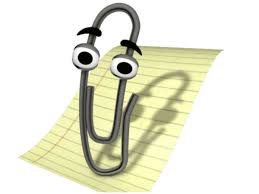
I have to admit, I’m a little worried. I’m a veteran of the 5-1/4-inch floppy disk era. Even before that, I navigated my way from typing class in high school (on typewriters) to computers with various floppy disk sizes and on through the many, many versions of Microsoft Word (remember when “Clippy” would give writing advice?).

Clippy, courtesy of Mental Floss

And then came email (woo hoo! Files could be attached and sent instantaneously) and the Internet. So far I’ve managed to move through these past 50 years of my writing career with a minimum of turmoil.

But I have to admit that the world of Artificial Intelligence is setting me back on my heels a little. While many of my colleagues have embraced and are using it well, I’m setting aside January to catch up. Here’s my reading material, Teaching with AI.

I have my concerns. As a writer, I’m honestly worried about my students deferring to AI and not understanding the creativity needed for every kind of writing — an email, a news release, a report. Having an AI just generate these annoys every part of me.

But I’ve been teaching long enough to know that writing doesn’t come easily to everyone. Even as I teach my students to use programs like Grammarly or Microsoft Word’s editing tools on their papers means I already have been teaching them to use AI.

So as I prepare for my spring Essentials of Written Communication class, I will be rewriting my curriculum to continue to teach the formatting and structure of various types of writing, while planning for students to use AI. I plan to create assignments for them to write and then edit with AI; I’ll be showing them how their human touch is still vital to anything they use AI to create; I’ll be talking about the ethical use of AI so they understand its creative limitations (and potential for plagiarism).

As the book says, “It is essential that educators start to talk about these issues with students. if we want students to use AI responsibly, both in school and beyond, AI ethics must be baked into curriculum and include AI literacy, an emerging essential skill” (3).

Do you use AI? How has it helped you? What concerns do you have about its use?

What kinds of jobs can a writer get?

OR How can I turn my writing into a career?

Helping my students turn their love for words and ability to write into a career is exactly what I’ve been trying to do with my life for the past 15 years.

I’m planning a class for spring 2025 that will be the introductory class to my Professional Writing major here at Taylor U. But I’ve set my sights a bit bigger as I also want to invite into the class any student who might be sitting around considering their major and thinking, “But I’m also a pretty good writer.” I want to offer a class where they can explore how their ability with words (which, believe me, isn’t something everyone has) can be leveraged into many types of jobs in their chosen fields.

Here’s the deal: Even though I teach the students who major in Professional Writing about the ins and outs of writing well and book publishing, I don’t leave them with the unrealistic dream that they’ll be able to make a living off the royalties from their published books (if, indeed, they get published). My students who have had their books published often still have day jobs — or have spouses who have day jobs. (I know you writers, laboring in the evenings or early mornings on your manuscripts in between bouts of “real life,” understand this.)

Gif from plaidswan.com

Most of my alumni are using their ability with words in many fields. I currently have former students in the following jobs:

  • Copy writer
  • Magazine editor
  • Book editor
  • Freelance editor
  • Digital content strategist
  • Communications director
  • Marketing director
  • SEO specialist
  • Publicist
  • Acquisitions editor
  • Literary agent
  • Author
  • Technical writer
  • Social media director
  • Proofreader
  • Email marketing manager
  • Blog writer
  • Web writer
  • Content writer

And no, AI is not going to replace all of these people. In fact, I plan to teach ways to use AI strategically to help us (and it can). However, we’re going to learn what we humans still need to know to help AI do its thing, as well as to help it deliver what’s needed.

Thus, as I create my syllabus for the coming semester, I hope to expose my students to the many opportunities available to anyone who can string words together in a coherent, concise, and clear manner. Good writers are desperately needed because content is desperately needed almost literally everywhere. Even writing a good email has become a lost art.

What jobs are you aware of that need good writers? Even if you’re a novelist by night or hammering away at your opus, where else do you use your writing skills?

Help me give my students some encouragement!

5 ways to stay sane on social media

We all probably have a love/hate relationship with social media. In these difficult times, how can we stay sane (and Christian) on social media?

I have talked often about the Social Media Strategy class I teach each semester at Taylor U. This summer, I wanted to rethink the class to make sure I am staying on the cutting edge of what’s happening in the social media world. I read (and highly recommend to you) two books:

Following Jesus in a Digital Age by Jason Thacker (Downers Grove, IL: InterVarsity Press, 2022)
Posting Peace by Douglas S. Bursch (Downers Grove, IL: InterVarsity Press, 2021)

I’d like to share with you a few takeaways that I also shared with my students, sourcing some quotes from these books as I go.

One key thing to realize right from the start: Technology is shaping our lives and our expectations.

We are so used to getting anything we want quickly. Amazon delivers in a couple of days. Have a question? Google it and have the answer in a matter of seconds. Click a button; get what we want.

The problem with this is that what’s real in life doesn’t work that way. Spiritual growth is a long, slow process that takes us a lifetime. There isn’t an app that will make us spiritual. Relationships — whether marriage or family or friends — take time and must weather ups and downs. How easy it is to decide something is too hard or taking too long, so we shut it down, let it go, turn away.

Technology has made us incredibly impatient. It has changed our expectations for how life should work. And not for the better.

So from these two books, I came away with 5 key points regarding our use of technology and social media that I shared with my class and I’d like to share with you. These are the things we need to keep in mind:

1. Keep in mind how social media is shaping us.

Wondering why social media can be such a toxic place (my goodness, especially now in a very divided country staring down a very divisive election)? Here’s what Bursch writes:

“Social media is more than just a medium for communication. The internet does more than magnify or amplify our expressions. Social media fundamentally changes what we say, when we say it, where we say it, why we say it, and how we say it. Most importantly, social media modifies who we are and what we are becoming. … [It is] revising our foundational understandings of moral decency, truth, and humanity.”  (Posting Peace, 25)

What can we do? We can slow down and process our thoughts. Not everything we think needs to be shared. It can be easy to hide behind a screen. We would be far better to chat with people in real life. It’s so simple to share posts without taking the time to actually educate ourselves, look for sources, find the facts. And, the capital T of God’s Truth should guide our every post and interaction.

Also realize that technology is monitoring everything we do and where we go online. If you’re more of a political liberal or a political conservative, you probably read certain sites and follow certain blogs. The algorithms are watching that and so sending you more of the same. What this does is entrench us into our divisions because we often don’t even see anything that disagrees with what we think.

2. Keep in mind how social media is causing us to lose our ability to build relationships.

Again from Bursch:

“Many individuals lack deep connections or the ability to form deep relational connection because they no longer have to maintain strong ties to function well in our online society. …Online communication ‘provides just enough connection to keep us from pursuing real intimacy. In a virtual community, our contacts involve little real risk and demand even less of us personally.’” (Posting Peace, 38, 39)

What can we do? We can realize that anything of value takes time to build, and what matters are those real people who are in our lives. Yes, we may have 900+ “friends” or “followers,” but, at the end of the day, who is going to be there for us? Are we taking the time and putting in the effort to strengthen our real relationships — the ones we have today, the new friends we could find tomorrow?

3. Keep in mind how social media affects our ability to handle conflict.

And life is full of conflict. But when we are impatient and don’t want to do the hard work, when we have not learned the basic skills for conflict management, we end up divided in our own camps, with no one able or willing to work on a compromise. We hunker down into our own little groups who agree with us and treat anyone who believes differently like an enemy. Bursch writes:

“In-person communication includes various verbal, facial, and environmental cues lost in online communication. … Because we’re not fully present online, capable of using all our senses, we don’t use our full brains to solve the relational complexities we face. When conflicts arise, we have fewer mental conflict processing tools at our disposal, which frequently leads to argumentative, depersonalized, detached, non-empathetic interactions.” (Posting Peace, 48)

What can we do? Think about how differently people deal with conflict online vs. conflict in person. People say things online they might never say to someone’s face. And rarely do those online conflicts lead to any kind of mutual respect and understanding. Real life discussions — even with differences of opinion or outright conflict — can do both. Let’s try to have more of those.

4. Keep in mind how we as believers must engage wisely.

Unfortunately, our world is filled with lies, manipulation, and gaslighting. We are at a point where we don’t know who is telling the truth; we don’t know who to believe. We as believers, writes Thacker,

“ . . . must engage any manipulation of truth in our world with eyes wide open. … We seek to understand the issues at stake and seek to apply God’s unchanging truths to our post-truth society. … We look bad news square in the eye (and learn more about it so that we might respond in a godly way) because our current hope and future security are in Christ, not in the culture around us.” (Following Jesus, 61-62)

What can we do? We need to be willing to do the work of seeking out the truth for ourselves, not simply believing and reposting every tweet or every Facebook post. We need to be people who focus back on the Truth, who can cut through the noise to the issues that are really at stake, and stand strong for what we believe.

5. Keep in mind how we as believers must honor the image of God in others.

Jesus must be our guide and model even as we engage in a world vastly different from 30 A.D. He taught us how to love others, and this must carry over into our online lives. Thacker writes:

“As Christians, our job is to testify to the reality of who God is and how he has made us to reflect him. The people we interact with online are not simply avatars. They are divine image bearers, just like you and me (Gen. 1:26-28). This means we must engage others online with grace and humility.” (Following Jesus, 66-67)

What can we do? Turn that social media time into prayer. Remember that behind that faceless X handle is a human being, and that human being has beliefs and opinions shaped by a plethora of experiences in his/her life. That’s why in-person conversations are so important, because that person becomes flesh and blood and you can get at what’s going on, why the person believes as he/she does. You can ask questions, follow up, share your own thoughts, reach an understanding or agree to disagree while still respecting each other’s place in God’s world. Absent the ability to chat in real life, let your social media feed become your prayer list instead of a place to argue (you’re not going to change anyone’s mind anyway). Everyone can use prayer.

We need to be careful today more than ever. What advice do you have for how you engage technology as a believer?

Create a personal social media calendar

As I mentioned in a previous post (4 keys to your author social media strategy), you as a writer need to be on social media, you need to choose the platform(s) that most works for you, and you need to be posting consistently.

“Aye, there’s the rub” (to quote Shakespeare). It’s difficult to be consistent.

In that post, I suggested that you create a weekly schedule that you can keep up with (and because that weekly schedule can repeat, you easily have a monthly schedule). I said that perhaps on Monday you’ll share on Facebook about something you learned in research for your book. On Wednesday you’ll post on Pinterest some photos you found about the time period of your historical fiction. On Friday, you’ll share the link to an article you read that was pertinent to your book’s topic. On Saturday, maybe a Canva-created quote from your book.

But if you’re a visual person like me, perhaps putting this on a calendar (physical or electronic) will help this make sense. This will keep you from worrying about posting or getting behind and having lapses of days or weeks at a time.

As I was posting around the release of Pathway to Publication, I needed to create a visual plan to help me to both remember to post and not stress about remembering to post.

Below is a sample week that I created at the time. This one week provided a template for the rest of the month — which then created a habit that’s easy to remember. Each day I describe a post or two and which platform. Of course, when I feel inspired, I can post more often. I take Sundays off and breaks on Saturdays between blog posts. And I only blog once a month. I wish I could do more, I just don’t have it in me with my other responsibilities.

Sample One Week Social Media Calendar

MonTuesWedThurFriSat
Insta and X: Create a Canva with helpful line from book.
Post.
FB and X:
Post regular weekly Typo Tuesday pictures.
X: Share a link to an article of interest about writing or books.Insta and X: Post humor meme about writing, teaching, or books. X: Ask convo starter question. Insta: Photo “day in my life.”Website: Work on blog. Plan 1x or 2x month. Share on FB & X.

You may have other social media to post on, or you might set aside a day each month to work on a newsletter. The point is to decide what you need to do and then schedule time each week or month to get it done.

So much less stress when you just have to do what is scheduled on each day to do!

Beyond the weekly schedule, I try to be aware of annual holidays and special days throughout the year tied to my brand — writing, editing, books, communication, teaching. (The following are courtesy of the Days of the Year site.) These can help focus the quotes I use.

  • January: New year, resolutions, how you can set up for a successful writing year, setting goals; January 9 (National Clean Your Desk Day); January 23 (National Handwriting Day)
  • February: God’s love for us; February 7 (National Send a Card to a Friend Day); February 14 (International Book Giving Day); National Library Lovers Month; Freelance Writers Appreciation Week (second week)
  • March: March 2 (Dr. Seuss Day); March 2 (World Book Day); March 4 (National Grammar Day); Easter (March or April)
  • April: Easter (March or April); spring cleaning; April 6 (National Bookmobile Day); April 20–26 (National Stationery Week); April 23 (World Book Night); April 27 (World Stationery Day); April 30 (Independent Bookstore Day)
  • May: My college students graduating; May 3 (Write a Review Day); May 16 (National Biographers Day); May 19 (National Notebook Day); Memorial Day
  • June: my professional writing summer academy week; June 23 (National Typewriter Day)
  • July: Info about the upcoming Taylor University Professional Writers Conference (held end of July); July 1 (Write a Letter Appreciation Week); July 4 (Independence Day); July 30 (Paperback Book Day)
  • August: Prep for the teaching semester; August 5 (Blogger Day); August 9 (National Book Lovers Day); August 31 (We Love Memoirs Day)
  • September: Back to teaching; Read a New Book Month; Sept 1 (World Letter Writing Day); September 6 (National Read a Book Day)
  • October: October 1 (International Coffee Day); October 18 (National Chocolate Cupcake Day—I love cupcakes; sue me); October 29 (National Cat Day—I own way too many cats)
  • November: November 4 (Fountain Pen Day); November 15 (I Love to Write Day); Veterans Day (I’m an Air Force brat); Thanksgiving
  • December: December 21 (National Short Story Day); Christmas

Now if you check up on me, you’ll probably not see this continued activity because I know what I should do but am not very good at execution. I did fairly well around the release of my book but have not been consistent since. Writing this post is making me think I need to get myself back on track.

What about you? What do you do to stay motivated and consistent with your social media postings?

Gif courtesy of https://metricool.com/social-media-gifs/

How to spot (and avoid) publishing predators

I’ve seen it happen one too many times (and one time is too many) — well-meaning writers get caught in the net set by predatory “publishers.” The writers thought they were getting published, only to find themselves with an inferior product (if indeed they end up with any product at all) and out a whole lot of money.

In a writers Facebook group recently, someone posted that they had received a phone call from a publisher who wanted to publish her book. She had some red flags (how did they even get her number, she wondered), so she asked the group for advice. Thankfully, every response warned her that this is a scam. I so appreciate all those seasoned writers in the online world helping one more person to not be a victim.

It’s sad to say, but the world is full of folks who are ready to take money from us moony-eyed writers who simply want to get our words out there. So how do you spot a scam?

You can spot these “publishers” by how eager they are to publish your book. Their process is simple. They will target you, do a sales job, flatter you and your book, make big promises, and then ask for money.

The fact that they target you is the first red flag. That’s not how the publishing process works. Generally, literary agents and acquisitions editors are wading through piles of proposals. They are working with the folks who know the process, not out seeking newbie writers and calling them on the phone offering to publish for a fee.

Let’s say you wrote a post on Facebook about finally finishing the writing of your book and then, magically, you receive an email or phone call from a company that effuses about your book and says they want to publish it!

Wow, you think, I didn’t realize it could be so easy!

Well, my friend, it isn’t. These folks are simply preying on new authors who haven’t yet gained the knowledge and experience of what it takes to publish a quality book. In short, they will publish anything as long as they get their money from you up front. They have no editorial standards. Their goal is not to create a quality product or see your book do well.

They are going to approach you first, flatter you, do a sales job, ask you to send them your manuscript, and ask for a credit card number for a large chunk of money (we’re talking in the thousands: $4K, $5K, $12K) for a list of services that they say they will provide (some of which are virtually meaningless, others that may or may not be delivered or may not be up to industry standards — such as their editorial process). They will send you a contract but generally the terms are not standard in the industry.

Hear me say this: These publishers are not trying to work with you to create a book of high quality. They just want your money.

You see, with traditional or independent publishers, they invest in your book so they have an interest in it selling well. They vet your work before publishing by studying your book proposal and sample chapters. They edit and copyedit and proofread and lay it out and create a compelling cover design and help with marketing. Because they make an investment in your book, they want to see it do well. They want to make back their investment and make money on it so that you also can make money on it.

Not so with these scam publishers. You will pay money and have no say over anything. Most detrimental of all, they contractually often take away your rights to your book — meaning you actually no longer own your book. You’ll have paid out of pocket and lost control of everything — including your book. It’s a lose-lose. These predatory publishers can afford to publish anything (no matter how poorly written or how poorly someone they hire edits it) because they aren’t making money on the sale of quality books — they are making money off you, the client. You pay them up front, so they get their money regardless of what happens with your book sales.

There is absolutely no risk to them. Some may offer up a little bit of service, but very often you will find yourself with a poor quality product that only works against you. Again, it’s a lose-lose for you.

Note that I’m focusing on those places who contact you. These may fashion themselves as “publishers” or “hybrid publishers” or “self-publishers.” And unfortunately this puts a bad face on the legitimate self-publishing or hybrid companies that, while they do charge money for their services, are working on a business model that is trying to help you create a superior product. See the link in the bulleted list below of ratings of self-publishing companies.

The key is, if it sounds too easy and too good to be true, it probably is. So before you outlay a chunk of your life’s savings, do some thorough research.

  • Look for information about the company online, especially complaints.
  • Check out this list of ratings for self-publishing companies.
  • Insist on receiving a sample contract that you can review. (If they want money first, don’t give it to them.)
  • Ask for some names of books the company has published that you can review. (Even if the company is legit, you do want to see what other types of books they publish so you know if you want to be part of their catalog.) If you can get your hands on physical books, even better, so you can check the quality. Get in contact with those authors online to ask about their experience.
  • Check out this post with more information about what to look for in order to avoid publishing scams.
  • Check out Writer Beware for other advice.

Chances are, you do all of the above with that publisher who called and flattered you, and you’ll discover a scam. Steer clear. Ultimately, you may continue your quest to get traditionally published, or you may steer toward a hybrid or self-publishing route. But you’ll be in charge, you’ll research and contact legitimate companies, and you’ll be able to create a product you can be proud of.