I honestly never thought much about SEO (search engine optimization) until one of my students. Grant, decided to take on that topic as his final senior project in our Professional Writing major. He had found the topic interesting during our Social Media Strategy class and decided he wanted to learn more.
He researched deep into the weeds of the topic, wrote his paper, and did a final presentation that allowed him to consolidate the research and give the basics of search engine optimization in a presentation that was understandable to those of us who knew nothing. After graduation, Grant got a job with Visit Indiana, the tourism arm of the State of Indiana — now working as webmaster for their website with its tens of thousands of pages. When it comes to SEO, he knows his stuff.
Search engine optimization basically optimizes your search on the search engines … which means that we want to write our titles and posts and internet copy using key words that searchers are going to put into the search bars. When we do so, there is more chance of the algorithm finding our material and bringing it higher on the results. (That’s a way-too-simplified version and it’s beyond my comprehension, but I do understand working with words to match search words.)
Every semester, Grant graciously returns to my classroom to present that basic introduction to SEO to my students. Many of them have no idea what it is or how to use it.
And, if I’m honest, neither did I.
I had started a YouTube channel a few years ago with nothing more than a few screenshotted videos of me showing writers how to do various tasks in Microsoft Word (creating a title page, creating a Table of Contents, etc.). I recorded one of them because a former employer asked me to show how to do style tagging so they could send the video to clients. I created others to go along with my Pathway to Publication book as part of the manuscript formatting chapter. My little YouTube channel sat fairly quiet, with a few folks clicking on and viewing my videos.
As Grant taught about SEO, he explained the power of using key words in titles and descriptions, thinking of what a searcher on Google is going to ask. He suggested that we plug in some questions, and then scroll down to the “People also ask” section to get an idea of those googled questions, the “How do I …?” questions. I went back and changed the titles and descriptions to my eight videos (I know, I said it was a small channel) to questions or statements someone would actually put into Google.
For instance, “Title pages” became “Creating a title page in Microsoft Word,” and in the description of the video is the question, “How do I add a title page to my manuscript?”
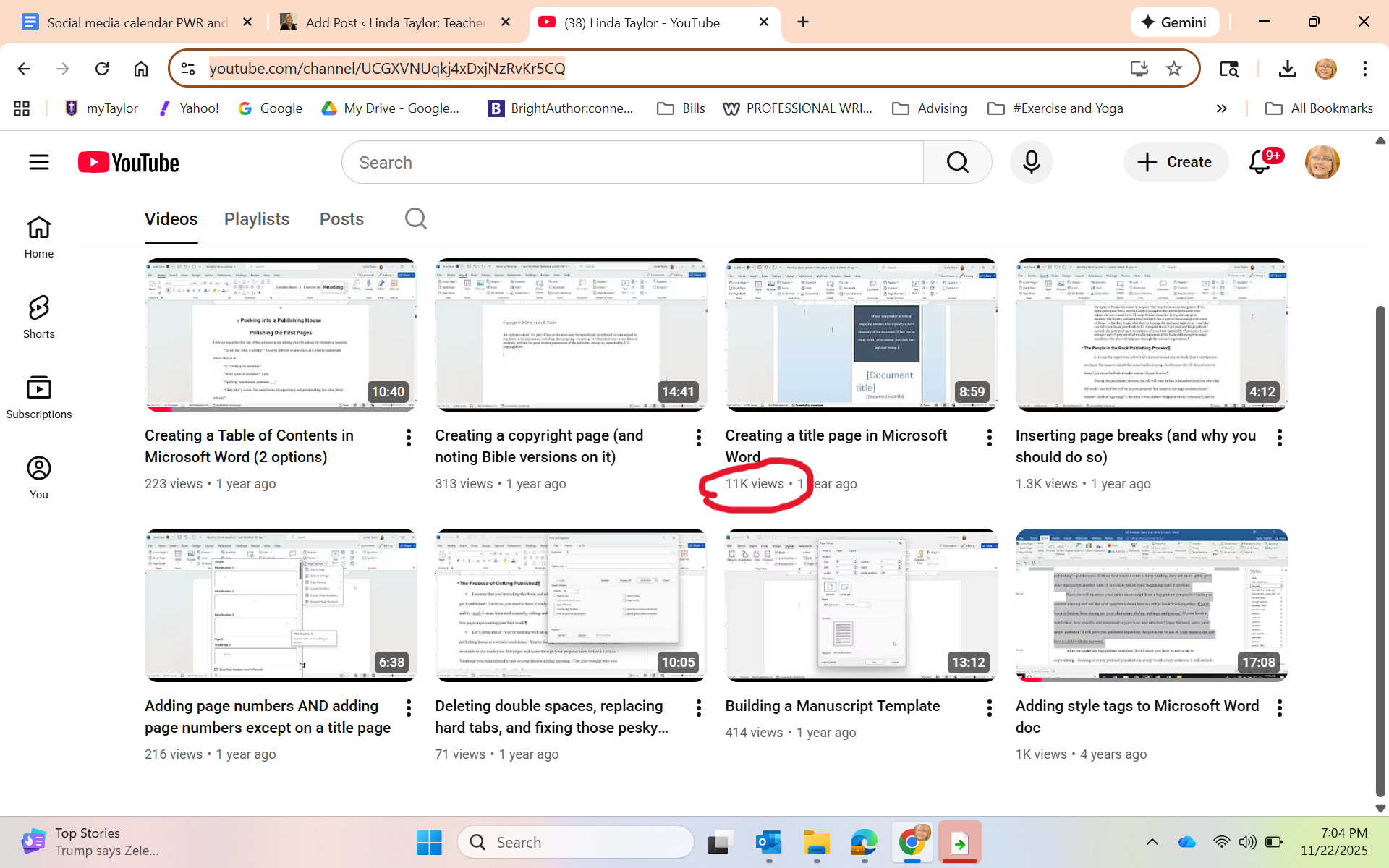
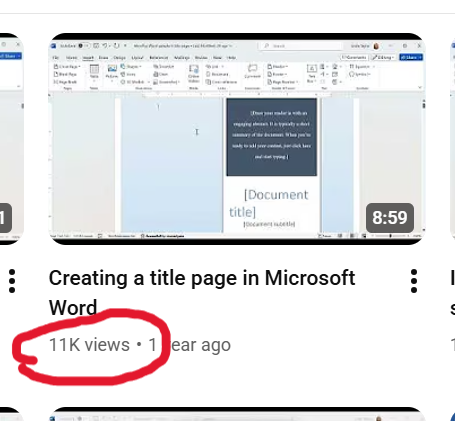
A few months passed without me checking in. Last week, I opened the YouTube page to show it to the students in my Editing class to let them know some of the things we talked about in class are in video form there. One student piped up: “Wow, you have 11,000 views on that one video.”
Whaaaaat?
Just in case you can’t see it:
I honestly didn’t think it was real. I sent the screenshot to Grant, thanking him profusely and asking him also if this could even be real. He checked it for me, and then sent me this screenshot, showing that my video appears as the first video option when he googled “how to create a title page in Microsoft Word.”
“You should be proud of yourself,” he kindly said.
I don’t think I’d say that. I just find it exciting to see that yes, indeed, SEO thinking works. AND that so many folks happened upon my little video and, hopefully, made killer title pages!
As I mentioned in a previous post (4 keys to your author social media strategy), you as a writer need to be on social media, you need to choose the platform(s) that most works for you, and you need to be posting consistently.
“Aye, there’s the rub” (to quote Shakespeare). It’s difficult to be consistent.
In that post, I suggested that you create a weekly schedule that you can keep up with (and because that weekly schedule can repeat, you easily have a monthly schedule). I said that perhaps on Monday you’ll share on Facebook about something you learned in research for your book. On Wednesday you’ll post on Pinterest some photos you found about the time period of your historical fiction. On Friday, you’ll share the link to an article you read that was pertinent to your book’s topic. On Saturday, maybe a Canva-created quote from your book.
But if you’re a visual person like me, perhaps putting this on a calendar (physical or electronic) will help this make sense. This will keep you from worrying about posting or getting behind and having lapses of days or weeks at a time.
As I was posting around the release of Pathway to Publication, I needed to create a visual plan to help me to both remember to post and not stress about remembering to post.
Below is a sample week that I created at the time. This one week provided a template for the rest of the month — which then created a habit that’s easy to remember. Each day I describe a post or two and which platform. Of course, when I feel inspired, I can post more often. I take Sundays off and breaks on Saturdays between blog posts. And I only blog once a month. I wish I could do more, I just don’t have it in me with my other responsibilities.
Sample One Week Social Media Calendar
Mon
Tues
Wed
Thur
Fri
Sat
Insta and X: Create a Canva with helpful line from book. Post.
FB and X: Post regular weekly Typo Tuesday pictures.
X: Share a link to an article of interest about writing or books.
Insta and X: Post humor meme about writing, teaching, or books.
X: Ask convo starter question. Insta: Photo “day in my life.”
Website: Work on blog. Plan 1x or 2x month. Share on FB & X.
You may have other social media to post on, or you might set aside a day each month to work on a newsletter. The point is to decide what you need to do and then schedule time each week or month to get it done.
So much less stress when you just have to do what is scheduled on each day to do!
Beyond the weekly schedule, I try to be aware of annual holidays and special days throughout the year tied to my brand — writing, editing, books, communication, teaching. (The following are courtesy of the Days of the Year site.) These can help focus the quotes I use.
January: New year, resolutions, how you can set up for a successful writing year, setting goals; January 9 (National Clean Your Desk Day); January 23 (National Handwriting Day)
February: God’s love for us; February 7 (National Send a Card to a Friend Day); February 14 (International Book Giving Day); National Library Lovers Month; Freelance Writers Appreciation Week (second week)
March: March 2 (Dr. Seuss Day); March 2 (World Book Day); March 4 (National Grammar Day); Easter (March or April)
April: Easter (March or April); spring cleaning; April 6 (National Bookmobile Day); April 20–26 (National Stationery Week); April 23 (World Book Night); April 27 (World Stationery Day); April 30 (Independent Bookstore Day)
May: My college students graduating; May 3 (Write a Review Day); May 16 (National Biographers Day); May 19 (National Notebook Day); Memorial Day
June: my professional writing summer academy week; June 23 (National Typewriter Day)
July: Info about the upcoming Taylor University Professional Writers Conference (held end of July); July 1 (Write a Letter Appreciation Week); July 4 (Independence Day); July 30 (Paperback Book Day)
August: Prep for the teaching semester; August 5 (Blogger Day); August 9 (National Book Lovers Day); August 31 (We Love Memoirs Day)
September: Back to teaching; Read a New Book Month; Sept 1 (World Letter Writing Day); September 6 (National Read a Book Day)
October: October 1 (International Coffee Day); October 18 (National Chocolate Cupcake Day—I love cupcakes; sue me); October 29 (National Cat Day—I own way too many cats)
November: November 4 (Fountain Pen Day); November 15 (I Love to Write Day); Veterans Day (I’m an Air Force brat); Thanksgiving
December: December 21 (National Short Story Day); Christmas
Now if you check up on me, you’ll probably not see this continued activity because I know what I should do but am not very good at execution. I did fairly well around the release of my book but have not been consistent since. Writing this post is making me think I need to get myself back on track.
What about you? What do you do to stay motivated and consistent with your social media postings?
Microsoft Word can be a mystery, I know. I have worked on manuscripts since way before Word came to be (back when we carried our precious documents from computer to computer on the 5-1/2 floppy — yes, actually floppy — disks). Well, and before that, I worked on an actual typewriter. But I digress. Over the years, I’ve seen the Microsoft Word program change and evolve, making life so much easier for all of us writers.
As I created both my Word by Wordbook, and then it’s companion titled Pathway to Publication, I wanted to give my readers material to help them with the formatting of their Word documents to the standards that most publishers require. In this post, I talked about some of those standards. In many of my “Let’s Get Tech-y” posts, I gave step-by-step instructions along with screenshots to help Word help you do what you need to do.
But guess what? I have now actually entered the world of YouTube <raucous applause>.
Minions image courtesy of GIFER
I mean, I currently have 8 videos and 2 followers, so I’m basically an influencer now.
In any case, I will continue to create simple videos to help writers navigate Microsoft Word on my YouTube channel (@lindataylor4207).
So far, I have the following videos for your enjoyment:
One of the joys of having written a book about the publishing process is gaining the opportunity to step out of the pages and help people in person. I wrote the book to advise writers who have a manuscript (or maybe at this point, just an idea) and are asking, “Now what?” My book lays out the pathway to publication. And while I hope lots of writers find help in the pages, I also know that sometimes coming to a gathering to discuss the process and get answers to their questions is even more helpful.
So I’m offering up just that. I’d love to meet your writers group, come and hang with you at one of your meetings, share some of what is in the book, and do a brief workshop to help writers get started.
The workshop will walk writers through the basic questions that publishers want to know — whether you’ve got a book idea or an article idea. I’ll help the writers in your group articulate the focus of their writing and make a plan to move forward.
I’m happy to come and do a one-hour session, or even a couple of hours. Let me know where your group is at, the questions, they have, and the type of advice that would best help them. If you’re beyond my driving distance, I can set up a Zoom call for as long as you need.
Contact me for availability and charges. I promise, I’m very affordable! We’ll work together.
Let me help take the mystery out of the publication process. Let me help the writers in your group take their first steps on the pathway to publication.
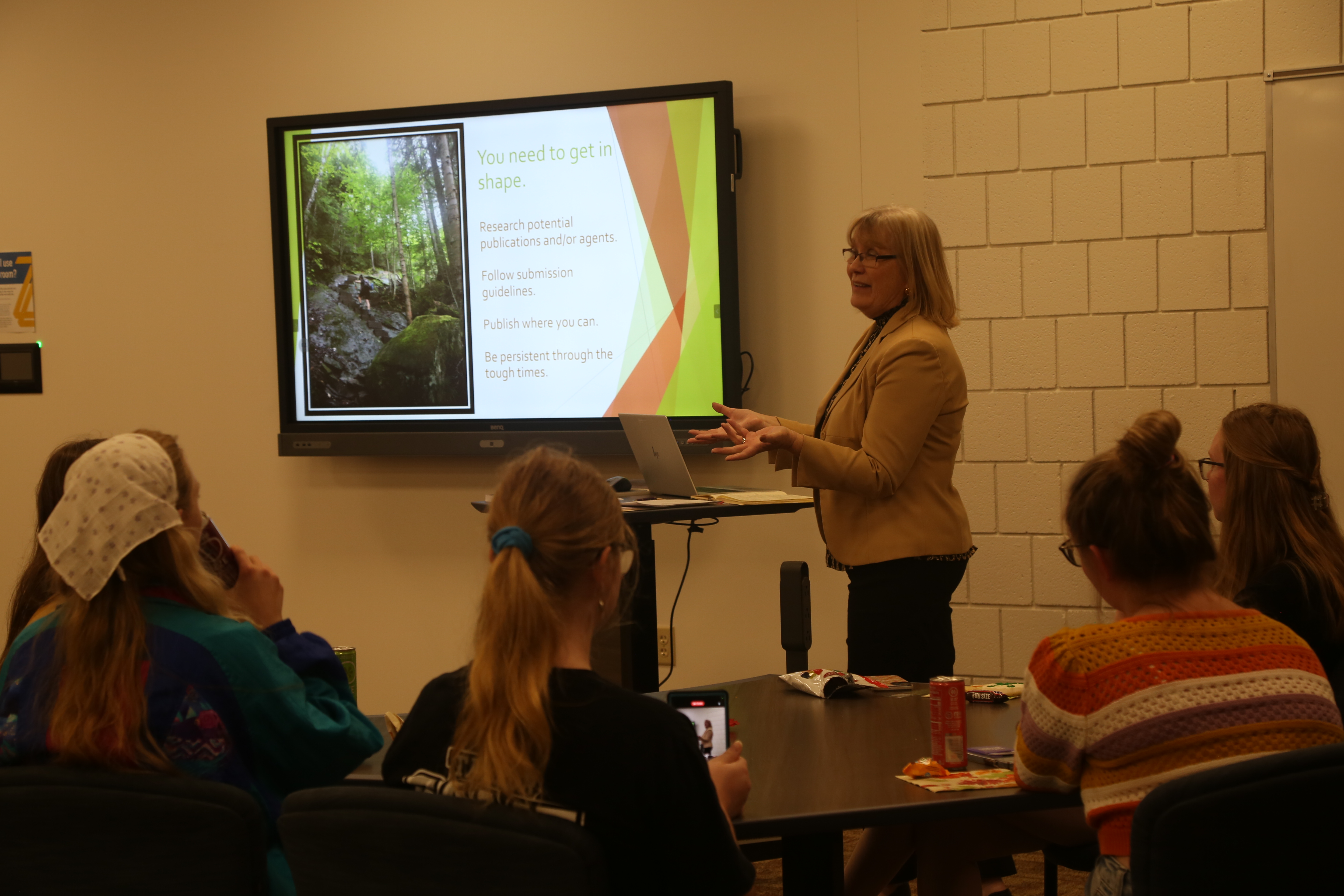
Following are a few photos from my book talk/workshop at Taylor University. (Cookies may or may not be included!)
We writers know that, on the one hand, we need self-confidence to put our writing out there and dare to get published, but we also need humility. We don’t want to go out into the publishing world with an arrogant attitude.
I dare say we will be served up humility constantly — we probably don’t need to seek it. We just need to learn how to deal with those times when embarrassing things happen.
Here’s my latest dilemma. I’ve talked on this blog about my latest book, Pathway to Publication. I’m very proud of this book (seriously, in the best way; you know, that “humble proud” attitude). I feel very good about the book and what it can offer writers.
There’s a meme out in the world that says if you want to do a really good proofread, get your book published and then open to any random page.
I laughed and laughed.
Then yesterday, I opened my book to two random pages.
I found two (count ’em, TWO) typos in my brief foray. This does not bode well for the rest of the book. I promise, my book was proofread by me, by editors, by the publisher, and again by me. I have no one to blame but myself. Me. Professional editor. Me.
First, on page 17, right away in the “How to Use This Book” section, I managed to say first that readers could download a “Microsoft Word or Excel” version of the worksheets on my website. Dear readers, I meant “Microsoft Word or PDF” (PDF appears later). In my proofread, I slid right right past it.
This second one, again, in my brief visit back into my printed book, appears on page 47, end of the first paragraph. Clearly I edited something in that sentence and left out the word “What” at the beginning (or I could have seen this and deleted the word “about”).
Seriously. Excuse me while I go away and eat some humble pie.
It’s just part of the process. I join a legion of professionally published books out there with typos.
As I’ve discussed in this post (and if you’ve been one of the wonderful folks who purchased my latest book Pathway to Publication), you know that I make comparisons of writing a book and getting it published to the very wearisome task of doing a thru-hike on the Appalachian Trail. My sister began her thru-hike on the trail on March 23, the day before my book released (definitely a God-thing), and as she blogs about her trip, I think the comparisons continue to be apt. You can find her blog at The Trek, Carol Fielding. Her trail name (all hikers have a trail name) is Fortune Cookie. More on that below.
You need the right gear, you need to be ready to face difficulties and overcome them, you need persistence, and you need a healthy dose of confidence as you try to get a book published. It’s a long trek.
A couple things I didn’t include in the book and have only discovered through my sister’s blogs are the terms “trail angels” and “trail magic.” On April 5, she writes this in a post titled “Angels and Magic in Georgia“:
“In case you don’t know what trail magic is, it’s when people set up at a road crossing or parking lot with food and drink. Sometimes they actually hike the food in and pass it out on the trail. Food you can’t carry with you on the trail. Fresh food. Those people are called trail angels and to hikers they are truly angelic.”
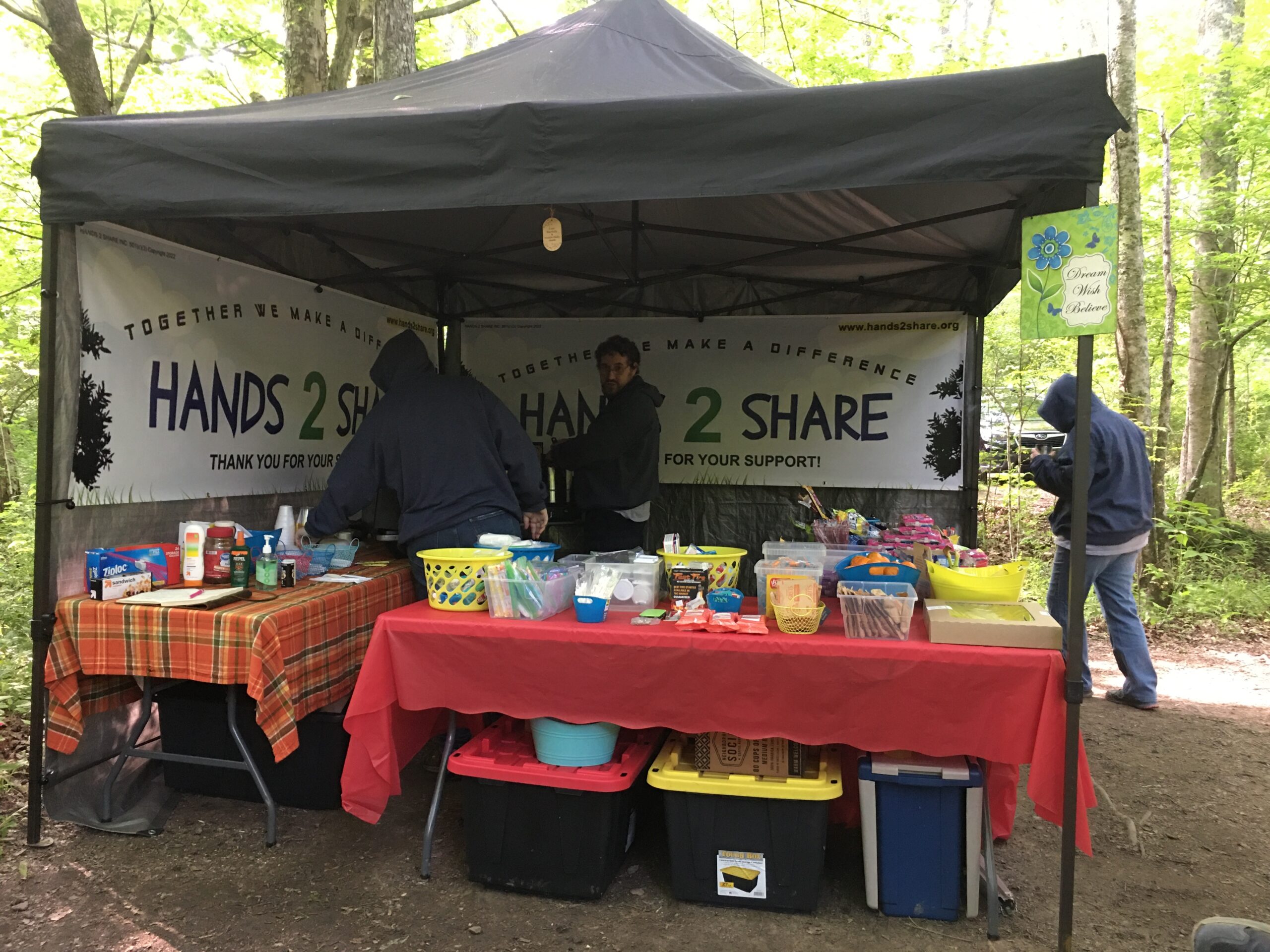
Folks who live near the Appalachian Trail will provide for hikers passing through. Sometimes it’s containers of fresh water beside a tree. Sometimes it’s chips and candy bars. Sometimes it’s a full-fledged setup with hot breakfast or a barbecue. Carol describes several instances of trail magic so far — Matthew with his chips, granola bars, and apples; a ministry with a tent making breakfast for all of the hikers; a church near the trail providing shuttle service to their kitchen and a free meal; the Southern cookie lady who set up fresh water and homemade cookies.
The need for fresh water is a constant, especially in these dry summer months. Photo courtesy Carol Fielding.Carol writes, “Nothing warms the heart of a hiker more than seeing a sign that reads, ‘Trail Magic Ahead.'” This group provides hot food and help with resupplying hikers with necessities. Photo courtesy Carol Fielding.
This got me to thinking about my trail comparisons with the book publishing process. Writing is by necessity a lonely endeavor. We walk the trail with only our thoughts (and our characters and our outlines) to keep us company. We get discouraged. The first draft is no better than a rain-soaked sleeping bag. The editing process looks as daunting as that hike up Clingman’s Dome. (In case you didn’t know, that’s the highest peak on the trail at 6,643 feet. Also the highest in the Great Smoky Mountains in Tennessee.)
We writers do indeed have our own brand of trail magic! We have writers conferences that encourage and inspire like a nice hot breakfast after some days of instant oatmeal. We have critique group friends who take the time to sit with pieces of our manuscript and help us make it better. We have beta readers who willingly take on the entire book in order to give feedback. We have writers groups that meet physically or online to encourage one another. We have numerous non-writer friends who understand us and help in whatever ways they can.
Basically, trail magic is folks caring for one another. And we writers have that in spades.
Oh, and about her trail name. My sister happened to get this little gem with some Chinese takeout in mid-2022, a year into planning her hike.
Photo courtesy Carol Fielding
And you know what? I think it applies to our writing trek as well.
Who has provided “trail magic” for you? Tell me about it in the comments.
As I noted in Part 1 of this topic, writers need a thick skin in order to handle the inevitable rejection that occurs as they submit their writing for publication.
Here, in Part 2, I want to discuss the entirely opposite reason that we need thick skin — dealing with the results of being accepted for publication: the inevitable reviews.
(The following is excerpted from my book Pathway to Publication, now available from Amazon.)
Be prepared for negative reviews
I’m going to burst your bubble, but only a little bit. I’m going to warn you about the perils of publication. Granted, this was your goal. But I want to make sure you’re prepared with a thick skin for the reviews of your book—maybe not in major publications, but everywhere that readers go. On blogs. On book reviewing websites. On Goodreads. On Amazon. And even when you write articles or blogs, be ready for folks to chime in wherever they can.
When your book is published, folks will read it and give their opinions. You may receive some five-star reviews on Amazon or Goodreads. You may receive some one-star reviews. Some readers will say yours is one of the best books they’ve ever read. Others will say your book wasted their time, and they didn’t finish reading it.
Be ready for both types of reviews. Take them at face value, realizing that never has any book pleased everyone. It always amazes me—the vast variety of comments and how a book can resonate with some people and be completely disliked by others.
I’ve started going to the Goodreads site online every time I finish a book, first to put it on my virtual shelves to keep track of what I’ve read, then to settle in and look for one-star reviews. Sometimes I have to scroll a bit, and sometimes they are waiting for me on the first page. I want to understand what makes people dislike a book. Sometimes the reviews help me pinpoint a niggling concern I had as I was reading—something I couldn’t quite put into words. Other times, it seems that readers are looking for something to complain about.
Some authors say that you shouldn’t read your reviews at all, for those very reasons.
But, let’s face it. You will.
When you see these reviews, you can’t do anything. These aren’t critique readers or your editor commenting. You can’t make changes. These are readers of your published work putting their opinions out in the world for all to see.
Take everything in stride. Remember that you can’t please everyone. Don’t take the one-star reviews so deeply to heart that you decide never to write again because you’re a failure. But, at the same time, don’t take the five-star reviews so deeply to heart that you decide never to write again because you can’t possibly do another book that would be as good. And if you do get many five-star reviews, stay humble.
Reviews are reviews. When you get hit with a one-star review (and you most likely will), don’t engage, go to battle, or try to change their mind. They read it, they didn’t like it, end of story. Move on. Some people just won’t get what you were trying to say or do in your book.
The problem is that no matter how many encouraging four- or five-star reviews you may get, it is those one- or two-star reviews that will keep you up at night, doubting yourself.
To make yourself feel better, choose a couple of favorite books you’ve read recently (choose some that are fairly new—not a classic from the 1800s).
Go to Goodreads or Amazon. Type in the title, find the book, and read the reviews. Read some five-star reviews (yay! They agree with you!). Now read some one- or two-star reviews (boo! They hated the writing, the metaphors, the characters, the plot, whatever).
Now realize that if your favorite book has such a variety of reviews, surely you are in good company.
Your best defense is to keep marketing your book and engaging with the folks who liked it—they are your audience, and they surely know others who will also like the book. And don’t be ashamed to ask for a positive review from them.
But don’t ASK for trouble
Here is where I get concerned and want to offer a warning. What you don’t want to happen is for your book to get legitimate negative reviews. What I mean is don’t be in such a hurry to self-publish (for instance) that you don’t have your book edited or proofread. If reviewers comment on typos and poor writing, that’s on you. Another issue would be rushing a book to press without fact checking or consideration of truthfulness. Seems obvious, right? Well, here is my plea to be careful and not to count on your editors to catch everything.
I never really thought about this until I finished reading Three Cups of Tea, by Greg Mortensen and David Oliver Relin. From the cover, it sounded like a lovely read about a man seeking to make a difference in Pakistan and Afghanistan in the late 1990s and early 2000s by building schools in remote villages. It topped The New York Times bestseller list for three years, so it must be good, right?
Well, not so much. It was an okay read. I didn’t love it, although I found it inspiring.
I finished the book, went to Goodreads to do my thing, and spent the rest of the afternoon reading review after review, which led me to article after article. The reviews, many of them glowing at first about the topic of the book (although many didn’t like the writing) turned negative after flaws and inconsistencies in the book began to be pointed out. Then in 2011, the60 Minutes TV show did an exposé about parts of the book that had been allegedly fabricated, along with alleged mismanagement of funds by Mortensen’s nonprofit. Some articles and blogs vilified the book and the authors. Others pointed out the great work Mortensen had done in the region in spite of those lapses in judgment.
All that to say, sadly, the hard work of the book has given rise to questions and lawsuits. What was the motivation for the material that was not factual—such as the story of getting lost coming down from a failed attempt to summit K2 and crossing a bridge to a village (a bridge that did not exist at the time)? This story in the book’s opening provides the impetus for the remainder of the book. So, having that story’s facts on the first pages challenged called into question the rest of the book.
The author recounts another story of visiting Mother Teresa’s charity just after her death and his thoughts as he was able to sit quietly with her body. Problem is, the author says he was there in 2000, but Mother Teresa died in 1997 (not difficult to fact check). And none of the book’s editors caught it.
Mortensen said in interviews that various details had to be conflated to get the millions of original words down to the workable and publishable amount. Perhaps it was just faulty memory, or editing gone awry, or running stories together to keep the narrative moving. I don’t know. I just know that as I read beyond the whiny reviews by people who didn’t like the writing style and got to these very problematic issues that took down the author’s reputation, I felt terribly sad.
Be cautious with what you put into the world
This is merely a cautionary tale. In your rush to get your book out there, don’t skip the important steps because, trust me, you won’t get away with it. Don’t publish a book that hasn’t been vetted, edited, copyedited, fact-checked, and proofread. Make sure it is truthful and represents writing you’re proud of.
Then, when the inevitable nay-sayers don’t like your book, their reasons will be from their own particular tastes versus legitimate concerns. But in the process, you can stand behind your work with no apologies or backtracking.
The experience of getting published is like nothing else! But as you trek along the pathway to publication, take your time, be careful, do it right. Your moment at the mountaintop will be the better for it.
Copy taken from Linda K. Taylor, Pathway to Publication (Friendswood, TX: Bold Vision Books), March 24, 2023, pp. 211-215.
My sister, that is. Today she leaves to begin on a dream that she’s been holding in her heart for over thirty years. She begins her thru-hike on the Appalachian Trail.
She has been planning this trip for the past couple of years. I first heard about it during a quiet late December evening in 2021 as we sat together chatting, keeping vigil over our dying mom. We held her hands and whispered, and Carol told me of this plan.
And now, the day has come. She and her husband (who will be accompanying her on portions of the trail) have donned their well-prepared backpacks and taken the first steps toward a decades-old dream.
My sister and brother-in-law at the first white blaze that marks the southern start of the Appalachian Trail on Springer Mountain, GA. Only 2,190 miles to go!
It was in some of those quiet conversations with Carol that a thought came to me: The kind of preparations and patience and planning required for such a trek for her to reach that dream are comparable to the kind of preparations and patience and planning required to get a book published.
I was in the beginning stages of writing my book about the process of publication. I was struggling for a hook, plagued by imposter syndrome. But her words ignited something in me.
And Pathway to Publication — the title, the plan, the hook, and eventually the cover design were born. (Thank you, Bold Vision Books for this perfect cover. Read more about the book on this page here on my site.)
When you get ready for a long hike, you don’t just put on your gym shoes and start walking. You need preparation, plans, accurate maps, and appropriate equipment. Likewise, when you step onto the pathway to publication, you can’t rush the process. The publishing world has its own language, processes, and gatekeepers. You need to take the time to develop a plan, create the required pieces, and understand each step along the way.
I wrote this book for the dreamers. Those of you out there who so much want to get published. You have a manuscript but you don’t know what to do next. What are the steps on the pathway to that dream of publication?
My book will help you get there.
My sister is making her dream a reality. I’m hoping to help you make your publication dream a reality.
And, incidentally, if you’d like to follow along my sister’s journey, you can read her blog updates here at “The Trek.”
I’m here to help be your guide on this pathway. Please feel free to contact me! In addition, I’d love to speak to your writers groups or conference. Helping writers is what I do.
You guys! I’m excited to tell you that my book, Pathway to Publication, could be available as soon as next month! (Stay tuned! Cover reveal soon!)
This past weekend, I’ve been working through the PDF of the typeset pages of my book to do a final proofread. The publisher kindly is allowing me to do so (since I’ve proofread hundreds of typeset books across my career and … well … definitely wanted to do it for my own). I have a system for proofreading and was eager to see how it played out.
I thought it might be helpful to you, my readers, to understand what the process looks like in checking the final look of book pages and doing a final proofread.
I love love love doing this part of any project. It’s like a treasure hunt making sure the pages are clean and looking for those errant and persistent typos.
So here we go:
On my first pass through the manuscript, I go page by page and do a visual check in several passes. I learned through difficult experience that my brain can’t handle trying to watch for all of the visual elements while also reading every word.
So I will go through the entire manuscript probably two or three times, focusing on different visual elements.
Visual scan of pages
I look down the right side of each page to make sure all paragraphs are justified right (meaning that the edge of the copy is straight). Most books have a straight right margin. If not, and they’re what is called “ragged right,” then I want to make sure that is consistent.
At the same time, I scan to see if the pages across each spread look even on the top and bottom.
Are the paragraph indents even? (Sometimes a random extra tab gets carried over from the Word document and shows up as a double tab on typeset pages.)
Running heads (or footers)
I go horizontally across each spread looking at the running heads (or footers). I’m checking to see if the wording is correct. Often a book will have the book title on the verso (left) page of a spread and the chapter title on the recto (right) side of the spread. I have often seen that the chapter title on the running head doesn’t match the actual chapter it’s in. (I even once copyedited a book where one of the words of the book’s title was missing from the running head on each verso page.)
I also look for “widows” and “orphans.” These are a single word or short line at the top or bottom of a page, or a subhead that’s hanging alone at the bottom of a page. These look awkward and unprofessional.
Chapter starts
I then go back to the beginning and check all of the chapter starts — the first pages of each chapter. Usually designers create an interior design that makes these pages different. The chapter number or title may start halfway down the page and there may be a drop cap on the first paragraph (a larger first letter).
There may also be a design element. (Look at the cool compass on the chapter starts of my book!) I check the first pages of each chapter for consistency. Sometimes the spacing is inconsistent or the drop cap is missing. (In the case below, I would like those two highlighted words, “or an,” moved to the next line so the lines are more even.)
Formatting of elements
I pull up my manuscript — the one I so carefully style tagged. You may not have style tagged, but you do know what level headings go where, what other elements require special formatting, etc.
I scan comparing my manuscript to the typeset pages to make sure the typesetter has differentiated and correctly rendered my levels of subheads. I make sure any box text (elements such as long quotations that should be indented) are done correctly. I check the bulleted text (sometimes bullets are on copy where they shouldn’t be and vice versa). You may have other elements, such as charts, diagrams, pictures. Make sure everything is where you want it and accompanying captions are correct.
Table of contents
I usually print out the pages of the Table of Contents (TOC) for cross checking as it makes less back and forth in the PDF. I always make sure the chapter title in the TOC matches the chapter title at the chapter start (I think every time I’ve proofread a book, I’ve found an error here). In Pathway to Publication, the editor asked me to make a detailed outline that put all my subheads in the TOC.
In my example below, I am marking places where my Level 2 heads need to be indented slightly under the Level 1 heads in the TOC.
Page numbers will be added on our next and final pass.
Now proofread!
Now you proofread every word. Every. Single. Word. Start with the title page (in the photo above I had to add the subtitle because — ahem — I hadn’t settled on one yet, so you can see my little highlight and comment), read every word on the copyright page, read every word slowly, look at every piece of punctuation, read every footnote, read every caption. At this point I make the page larger on my screen so I don’t strain my eyes.
Besides the spelling and punctuation, notice lines that look scrunched together or where the letters look too loose. This means the “kerning” is off and you can ask the typesetter to fix it if it looks awkward.
Sometimes lines may look too close to the lines above them. This is an issue with the “leading,” and again, you can ask your typesetter to check and adjust it.
Then you need to read every bit of the back matter. That bibliography? Check the formatting and that each element is included. Appendices, glossaries, indexes, oh my! This is where those of us who also love copyediting really strut our stuff!
And here’s the kicker. I will do all this and there will still be typos. Ughhh. Perhaps I’ll do a contest and we can all treasure hunt together.
Do you have any tips and tricks for doing proofreading?










 Linda Taylor: Teacher, Editor, Publishing Professional