The last person who works on the words in the manuscript is the proofreader. This is still part of the editing process, but the proofreader has little say about the manuscript itself. By the time the proofreader gets the manuscript, the designer and typesetter have done their jobs and created a PDF that will look like the final book.
The proofreader looks over the entire book visually, then reads every word, every sentence, every paragraph, and every piece of punctuation. Any corrections are marked on the PDF and sent back to the typesetter for correction.
If content editing is the 10,000-foot view, and if copyediting is the 1,000-foot view, then proofreading is the 10-foot view. At this point, the content edit has handled the big-picture issues and the copyedit has cleaned up all of the sentences. Now, as proofreader, you should be able to dig in and look closely for errors.
The proofreader’s job
The proofreader is not an editor or copyeditor. No one wants the proofreader’s input on the book’s content, or how well the sentences are written, or whether a character is flat or not. Truly, no one cares. That is not the proofreader’s job to give that kind of feedback.
While proofreaders are looking for errors only, it’s a far bigger job than just reading copy. The proofreader carefully goes over the entire visual look of a project—whether it’s the pages of a book or a magazine or a newspaper. Even if a manuscript looks perfect when turned in to typesetting, errors can occur in layout that don’t show up on a manuscript.
For example, if a random tab is embedded in the Word document—a tab that hasn’t resulted in actually moving the words to an odd location on the line (perhaps because the tab was close to a tab stop and therefore is there but not seen)—that tab will rear its ugly head on the typeset page by taking the words and spreading them far apart on a line. Only the proofreader will see this.
In the same way, sometimes Microsoft Word can bury random font sizes and, when typeset, suddenly the font size on a page will vary between paragraphs. I’ve proofed pages where I could clearly tell that one paragraph had a slightly larger font than the surrounding paragraphs. I had to mark it and ask the typesetter to double check the font size and fix it to be consistent.
If copy has to fit into a certain pre-designed space on a page (say a column in a magazine or newspaper, or a small page in a devotional book), run-over can occur, resulting in copy that just appears to be missing. A proofreader can go through and delete as needed to keep the piece intact but have it still fit. This is where having a proofreader who is a wordsmith can be very valuable. Generally, you don’t want to leave this to typesetters to do (and they don’t want to).
Proofreaders look over the pages to make sure the visual elements look right and are consistent. When I proofread a book, for example, I look at individual elements across all of the pages; that is, I don’t try to look for everything on every page at the same time. Sometimes there are too many things happening on the pages.
I have proofread several devotional books. In one series in particular, every page had a date, every month had its own color that was used for the running heads (those dates) and various parts of the copy. The first paragraph of each devotional used a drop cap (a larger capital letter, also in that’s month’s color). There were specific spacing and centering issues, and a box at the bottom held a few words of encouragement for the day.
The types of errors I found were color mistakes, too many words in a devotional resulting in the typeset page ending in the middle of a sentence (I had to go back to the original manuscript to find out what the rest of the devo said and then find a way to edit so that it would fit), some spacing issues at the ends of lines, hyphenation problems, and ellipses that broke over lines and needed to be pulled back together.
Proofreaders check the running heads—in the case of books, these are the lines across the tops of the pages. Usually on the verso (left-hand, even numbered) page, the book name appears; on the recto (right-hand, odd numbered) page is the chapter title. The proofreader checks that the chapter title running heads are indeed in the chapter with that name. I once was looking at Bible pages and the book of Deuteronomy still had the Genesis running head; another time I proofread a book where the running head on the verso page was missing a word out of the title.
Very few of the corrections will have to do with spelling or grammar errors if you had a good copyeditor; most will have to do with issues that arose in typesetting and would not be seen until proofreading those typeset pages.
The process of proofreading
When I proofread a book, I use a checklist (included below) to make sure that I remember to look at everything.
Overall look
It’s important to first do an overall look at the book, page by page. It’s impossible to try to do that while reading the pages. Better to go page by page and check visual elements first. For instance:
- most books have justified right margins; scan each page that all paragraphs are consistent
- if the chapter beginnings are all to start on a recto, or if they can start on either a recto or verso, that this is indeed happening
- if the chapter start pages all begin in the same spot—that is, if they begin halfway down the page, that the spacing is the same on all of them
- if the chapter title begins with a number or the number along with a title that the numbers are sequential and that the fonts are the same (I once proofed a book that had two chapter 8s and no chapter 9—it was just a typo)
- that if the first paragraph of a chapter begins with a drop cap (a larger first letter dropped down into the paragraph) that every chapter begins with a drop cap
- alignment along tops of bottoms of pages
- running headers or footers are consistent
- consistency across all pages and design elements
The actual reading
After all of this is completed, only then do I go back and read every word. Every word. From the title page, through the copyright page, through the Table of Contents, through the endnotes.
- mark only true errors and inconsistencies
- watch for widows and orphans (the single word or two sitting alone at the top or bottom of a page)
- correct grammar, spelling, and punctuation
- following the publisher style guide and editor style sheet
- citations: footnotes or endnotes; bibliography entries
For illustration of some of the above points, check this post for when I was proofreading my book.
Becoming a proofreader
As with the copyediting job, proofreading can also be your entree into the editorial publishing world. Often these jobs are outsourced by publishers to freelancers. Much of the advice and resources for becoming a copyeditor apply to being a proofreader. You need to know grammar, punctuation, and spelling; you need to understand the style manuals, guides, and sheets; you need to practice. Here are a few more:
(1) Learn how to work with Adobe (you’ll need it on your computer so you can open the PDF files). A free version allows you to do what you need to do — see the PDF pages and highlight and note errors. With a free version, you can’t actually make the edits; you can only mark them — but seriously, leave the revisions to the typesetter who knows what she’s doing. A change you make could cause a page to reflow, creating other issues on subsequent pages. So stay in your lane and just mark the changes.
(2) Practice whenever you can — not just with reading words but also with noticing inconsistencies in visuals (fonts, colors, spacing, etc.). Offer to proofread others’ writing — blogs, resumes, cover letters, the church newsletter, anything. Just continue to hone your skills.
Here are a few online resources for practice:
- Basic Proofreading Test (Quiz)
- Quiz General Proofreading
- Can you ace this basic proofreading quiz?
- Portland Proof “Proof It” Game
- Test Genius, Practice Proofreading
(3) As noted with copyediting, don’t use AI tools like ChatGPT. Don’t ever put a PDF of someone’s work into such a program! It has to be done by you. If an experienced proofreader can come along behind you to help you see what you might have missed, that would be invaluable in your training.
(4) Hone your skills in attention to detail. Often I’ve been proofreading a manuscript and come across some inconsistency that jars me. For instance, something like a name, Billie. I’ll think to myself, “Didn’t I see it spelled as Billy somewhere else?” A quick search for Billy will show me if that’s the case; the number of instances of one or the other gives me a sense of what the author really wanted to do. And I would make a note that the name needs consistent spelling.
(5) While most proofreading is done on PDFs, once in a while you may have to proofread on actual paper. This is where you’ll need to learn proofreader marks. I’ve placed a sheet here that you can download to learn some of the most used markings.
As noted with Part 2, Copyediting, proofreading can also be an entree into the publishing world.
And as a final note, whatever monk was proofing what became known as The Wicked Bible, missed the word “not”:
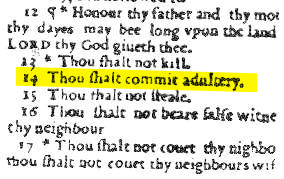
We proofreaders often save people a whole lot of confusion and consternation. And sometimes morality!


 Linda Taylor: Teacher, Editor, Publishing Professional